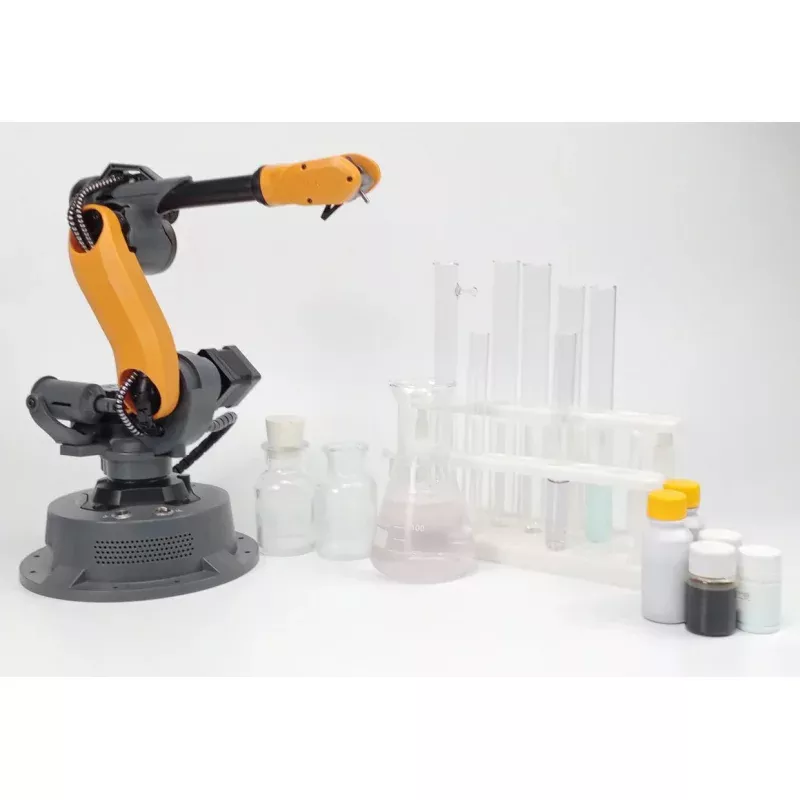
WLKATA Mirobot Advanced Kit
Overview
The WLKATA Mirobot Advanced Kit is a compact 6-axis desktop robotic arm built for the classroom, adding voice control and a full multi-tool end-effector set to the Mirobot platform. It brings real robotics engineering, including forward and inverse kinematics, motion planning, and pick-and-place, into a tabletop format that fits a school lab. The Mirobot has the same 6+1 axis configuration as a typical industrial robot, so students learn concepts that carry directly into industry.
The arm has a 315 mm reach and a repeatability of 0.2 mm, with a standard payload of 250 grams (up to 400 grams when moving near the desktop). Its joints use high-accuracy stepping motors with reducers. Multiple control methods, from block-based coding for beginners to Python and ROS for advanced users, make it suitable for a wide range of ages and course levels, and the Advanced Kit adds voice control for hands-free operation.
The kit is designed as a complete classroom package, pairing the arm with a control box, a set of end effectors, WLKATA software, and a student textbook, so a teacher can get a class started with a clear, structured path. It also expands into the wider WLKATA ecosystem with the conveyor belt, sliding rail, AI Vision Set, and AGV Rover base.
Specifications
| Robotic Arm | |
|---|---|
| Model | WLKATA Mirobot |
| Axes | 6+1 (6 axes plus 1 additional degree of freedom) |
| Standard Payload | 250 g |
| Maximum Payload | 400 g (moving near the desktop) |
| Reach | 315 mm |
| Repeatability | 0.2 mm |
| Base Diameter | 160 mm |
| Build and Control | |
| Joints | High-accuracy stepping motors with reducers |
| Controller | Arduino Mega 2560 based control box |
| Connectivity | Bluetooth, WiFi, RS485, and a custom API |
| Voice Control | Included with the Advanced Kit for hands-free operation |
| Software and Programming | |
| WLKATA Software | WLKATA Studio (Blockly, teach-and-play, Python, G-code) and BlockFactory |
| Languages | Blockly, Scratch, Python, C++, and G-code |
| Developer Platforms | ROS, ROS2, CoppeliaSim (V-REP), Webots, MATLAB, and NVIDIA Omniverse |
| End Effectors | |
| Included Tools | Pen holder, micro servo gripper, and pneumatic set (suction cup, two-finger and three-finger soft grippers) |
| Optional Tools | Laser engraver, 3D-printer extruder, and CNC spindle |
Key Features
- True 6-Axis Kinematics: The 6+1 axis layout matches a typical industrial robot, so students learn real forward and inverse kinematics rather than a simplified model.
- Voice Control: The Advanced Kit adds voice control, so programs can be launched and the arm moved with spoken commands for hands-free teaching and testing.
- Classroom-Ready Precision: 0.2 mm repeatability supports repeatable experiments such as pick-and-place, path following, and calibration.
- Multiple Ways to Program: Start with Blockly visual coding, then progress to Python, G-code, ROS, and MATLAB as skills grow.
- Interchangeable End Effectors: Swap a pen holder, micro servo gripper, and pneumatic set, with an optional laser engraver, extruder, and CNC spindle.
- Wireless Control: Connects over Bluetooth and WiFi, with RS485 and a custom API for building your own controllers.
- Complete Curriculum: Includes WLKATA software and a student textbook with lesson plans for structured learning.
Applications
The Mirobot Advanced Kit is used by schools and universities in more than 40 countries to teach core robotics. Because it keeps a true 6-axis design at a fraction of the cost of a full industrial robot, it is a practical way to introduce robotics across multiple grade levels while retaining enough technical depth for specialized STEM and CTE programs. Students gain hands-on experience with forward and inverse kinematics, path planning, end-effector control, and coordination with external sensors.
The platform scales from block-based coding through Python, ROS, and MATLAB, so an introductory class and a university engineering course can share the same hardware. Paired with the WLKATA AI Vision Set, conveyor belt, sliding rail, or AGV Rover base, the arm extends into AI vision sorting, mini production lines, and mobile-manipulation projects, connecting classroom exercises to the simulation and automation tools used in industry.
Setup and Getting Started
- Unbox and inspect: Remove the Mirobot, control box, and end effectors, and check for shipping damage.
- Mount the base: Set the arm on a stable surface, allowing room for its 315 mm reach.
- Connect power and control: Connect the control box and power supply, and pair over Bluetooth or WiFi.
- Install WLKATA Studio: Install the software from the WLKATA Download Center and try the teach-and-play and Blockly modes first.
- Attach an end effector: Fit the gripper or a pneumatic tool; tools swap in about 30 seconds with the thumb screws.
- Run a first program: Follow the included textbook to run a simple pick-and-place, then move on to Python, ROS, or voice control.
What’s Included
- Robotic Arm: WLKATA Mirobot 6+1 axis arm (x1)
- Control Box: Arduino Mega 2560 based control box and power supply (x1)
- Voice Control: Voice control module for hands-free operation (x1)
- End Effectors: Pen holder, micro servo gripper, and pneumatic set (suction cup, two-finger and three-finger soft grippers)
- Teach Pendant: Wireless Bluetooth teach pendant (x1)
- Software: WLKATA Studio and BlockFactory access, plus open-source SDKs
- Curriculum: Student textbook and free Mirobot programming and control course
Documentation and Resources
- Software Download Center: WLKATA Download Center
- Python SDK (GitHub): WLKATA-Python-SDK-wlkatapython
- ROS2 Packages (GitHub): WLKATA ROS2 packages
- MATLAB and V-REP Demo (GitHub): Mirobot MATLAB and V-REP demo
- MATLAB User Manual: MATLAB for robotic arms
- User Manuals: WLKATA documentation portal
- Video Tutorials: Mirobot beginner tutorials
- Academy Textbook: Mirobot Programming and Control (free)
- Community: WLKATA Discord
Warranty Information
The WLKATA Mirobot Advanced Kit is covered by the WLKATA Product Warranty Policy, provided by Wristline Inc. (WLKATA) or its authorized agents. RoboticsSelect is an authorized WLKATA dealer, so warranty support is handled through us.
| Item | Coverage |
|---|---|
| Robotic Arm | 1-year warranty |
| Spare Parts | 3-month, 6-month, or 1-year warranty, depending on the part |
| Consumables | Not covered under warranty |
Not Covered
- Damage from misuse, accident, or operation outside the documented limits
- Damage from unauthorized repair, disassembly, or modification
- Consumable and wear parts
Warranty service requires a valid proof of purchase.